
spool Undo_Diag.out  ttitle off
set pages 999
set lines 150
set verify off set termout off
set trimout on
set trimspool onREM
REM ------------------------------------------------------------------------  REM
REM  -----------------------------------------------------------------
REM  set space 2  REM  REPORTING TABLESPACE INFORMATION:
REM
REM  This looks at Tablespace Sizing - Total bytes and free bytes
REM   column tablespace_name  format a30            heading 'TS Name'
column sbytes           format 9,999,999,999  heading 'Total MBytes'
column fbytes           format 9,999,999,999  heading 'Free MBytes'
column file_name        format a30            heading 'File Name'
column kount            format 999            heading 'Ext'  compute sum of fbytes on tablespace_name
compute sum of sbytes on tablespace_name
compute sum of sbytes on report
compute sum of fbytes on report  break on tablespace_name skip 2  select a.tablespace_name,  a.file_name,  round(a.bytes/1024/1024,0) sbytes,  round(sum(b.bytes/1024/1024),0) fbytes,  count(*) kount, autoextensible
from   dba_data_files a,  dba_free_space b
where  a.file_id  =  b.file_id
and a.tablespace_name in (select z.tablespace_name from dba_tablespaces z where retention like '%GUARANTEE')
group  by a.tablespace_name, a.file_name, a.bytes, autoextensible
order  by a.tablespace_name
/  set linesize 160  REM
REM  If you can significantly reduce physical reads by adding incremental
REM  data buffers...do it.  To determine whether adding data buffers will
REM  help, set db_block_lru_statistics = TRUE and
REM  db_block_lru_extended_statistics = TRUE in the init.ora parameters.
REM  You can determine how many extra hits you would get from memory as
REM  opposed to physical I/O from disk.  **NOTE:  Turning these on will
REM  impact performance.  One shift of statistics gathering should be enough
REM  to get the required information.
REM   REM
REM  -----------------------------------------------------------------
REMset lines 160col tablespace_name format a30 heading "Tablespace"
col tb format a15 heading "TB Status"
col df format a10 heading "DF Status"
col extent_management format a15 heading "Extent|Management"
col allocation_type format a8 heading "Type"
col segment_space_management format a7 heading "Auto|Segment"
col retention format a11 heading "Retention|Level"
col autoextensible format a5 heading "Auto?"
col mx format 999,999,999 heading "Max Allowed"select t.tablespace_name, t.status tb, d.status df,
extent_management, allocation_type, segment_space_management, retention,
autoextensible, (maxbytes/1024/1024) mx
from dba_tablespaces t, dba_data_files d
where t.tablespace_name = d.tablespace_name
and retention like '%GUARANTEE'
/col status format a20 head "Status"
col cnt format 999,999,999 head "How Many?"select status, count(*) cnt
from dba_rollback_segs
group by status
/set termout on
set trimout off
set trimspool off
set lines 120
set pages 999set termout off
set trimout on
set trimspool onalter session set nls_date_format='dd-Mon-yyyy hh24:mi';prompt
prompt  ############## RUNTIME ##############
promptcol rdate head "Run Time"select sysdate rdate from dual;prompt
prompt  ############## DATAFILES ##############
prompt col retention head "Retention"
col tablespace_name format a30 head "TBSP Name"
col file_id format 999 head "File #"
col a format 999,999,999,999,999 head "Bytes Alloc (MB)"
col b format 999,999,999,999,999 head "Max Bytes Used (MB)"
col autoextensible head "Auto|Ext"
col extent_management head "Ext Mngmnt"
col allocation_type head "Type"
col segment_space_management head "SSM"select tablespace_name, file_id, sum(bytes)/1024/1024 a, sum(maxbytes)/1024/1024 b, autoextensible
from dba_data_files
where tablespace_name in (select tablespace_name from dba_tablespaceswhere retention like '%GUARANTEE' )
group by file_id, tablespace_name, autoextensible
order by tablespace_name
/set termout on
set trimout off
set trimspool offttitle off
set pages 999
set lines 150
set verify off set termout off
set trimout on
set trimspool onREM
REM ------------------------------------------------------------------------  REM
REM  -----------------------------------------------------------------
REM  REM
REM  REPORTING UNDO EXTENTS INFORMATION:
REM
REM  -----------------------------------------------------------------
REM
REM  Undo Extents breakdown information
REMttitle center "Rollback Segments Breakdown" skip 2col status format a20
col cnt format 999,999,999 head "How Many?"select status, count(*) cnt from dba_rollback_segs
group by status
/ttitle center "Undo Extents" skip 2col segment_name format a30 heading "Name"
col "ACT BYTES" format 999,999,999,999 head "Active|Extents"
col "UNEXP BYTES" format 999,999,999,999 head "Unxpired|Extents"
col "EXP BYTES" format 999,999,999,999 head "Expired|Extents"select segment_name,nvl(sum(act),0) "ACT BYTES",nvl(sum(unexp),0) "UNEXP BYTES",nvl(sum(exp),0) "EXP BYTES"from (select segment_name,nvl(sum(bytes),0) act,00 unexp, 00 expfrom DBA_UNDO_EXTENTSwhere status='ACTIVE' group by segment_nameunionselect segment_name,00 act, nvl(sum(bytes),0) unexp, 00 expfrom DBA_UNDO_EXTENTSwhere status='UNEXPIRED' group by segment_nameunionselect segment_name,00 act, 00 unexp, nvl(sum(bytes),0) expfrom DBA_UNDO_EXTENTSwhere status='EXPIRED' group by segment_name
) group by segment_name;ttitle center "Undo Extents Statistics" skip 2col size format 999,999,999,999 heading "Size"
col "HOW MANY" format 999,999,999 heading "How Many?"
col st heading a12 heading "Status"select distinct status st, count(*) "HOW MANY", sum(bytes) "SIZE"
from dba_undo_extents
group by status
/col segment_name format a30 heading "Name"
col TABLESPACE_NAME for a20
col BYTES for 999,999,999,999
col BLOCKS for 999,999,999
col status for a15 heading "Status"
col segment_name heading "Segment"
col extent_id heading "ID"select SEGMENT_NAME, TABLESPACE_NAME, EXTENT_ID, FILE_ID, BLOCK_ID, BYTES, BLOCKS, STATUS
from dba_undo_extents
order by 1,3,4,5
/REM
REM  -----------------------------------------------------------------
REM
REM  Undo Extents Contention breakdown
REM  Take out column TUNED_UNDORETENTION if customer
REM   prior to 10.2.x
REM
REM   The time frame can be adjusted with this query
REM   By default using around 4 hour window of time
REM
REM   Ex.
REM   Using sysdate-.04 looking at the last hour
REM   Using sysdate-.16 looking at the last 4 hours
REM   Using sysdate-.32 looking at the last 8 hours
REM   Using sysdate-1 looking at the last 24 hours
REMset linesize 140ttitle center "Undo Extents Error Conditions (Default - Last 4 Hours)" skip 2col UNXPSTEALCNT format 999,999,999  heading "# Unexpired|Stolen"
col EXPSTEALCNT format 999,999,999   heading "# Expired|Reused"
col SSOLDERRCNT format 999,999,999   heading "ORA-1555|Error"
col NOSPACEERRCNT format 999,999,999 heading "Out-Of-space|Error"
col MAXQUERYLEN format 999,999,999   heading "Max Query|Length"
col TUNED_UNDORETENTION format 999,999,999  heading "Auto-Ajusted|Undo Retention"
col hours format 999,999 heading "Tuned|(HRs)"select inst_id, to_char(begin_time,'MM/DD/YYYY HH24:MI') begin_time, UNXPSTEALCNT, EXPSTEALCNT , SSOLDERRCNT, NOSPACEERRCNT, MAXQUERYLEN,TUNED_UNDORETENTION, TUNED_UNDORETENTION/60/60 hours
from gv$undostat
where begin_time between (sysdate-.16) and sysdate
order by inst_id, begin_time
/set termout on
set trimout off
set trimspool offttitle off
set pages 999
set lines 150
set verify off
set termout off
set trimout on
set trimspool onREM
REM ------------------------------------------------------------------------  col name format a30
col gets format 9,999,999
col waits format 9,999,999  PROMPT  ROLLBACK HIT STATISTICS:
REM   REM  GETS - # of gets on the rollback segment header
REM  WAITS - # of waits for the rollback segment header  set head on;  select name, waits, gets
from   v$rollstat, v$rollname
where  v$rollstat.usn = v$rollname.usn
/  col pct head "< 2% ideal"select 'The average of waits/gets is '||  round((sum(waits) / sum(gets)) * 100,2)||'%' PCT
From    v$rollstat
/  PROMPT  REDO CONTENTION STATISTICS:REM
REM  If the ratio of waits to gets is more than 1% or 2%, consider
REM  creating more rollback segments
REM
REM  Another way to gauge rollback contention is:
REM   column xn1 format 9999999
column xv1 new_value xxv1 noprint  select class, count
from   v$waitstat
where  class in ('system undo header', 'system undo block', 'undo header',        'undo block'          )
/  set head offselect 'Total requests = '||sum(count) xn1, sum(count) xv1
from    v$waitstat
/  select 'Contention for system undo header = '||  (round(count/(&xxv1+0.00000000001),4)) * 100||'%'
from  v$waitstat
where   class = 'system undo header'
/  select 'Contention for system undo block = '||  (round(count/(&xxv1+0.00000000001),4)) * 100||'%'
from    v$waitstat
where   class = 'system undo block'
/  select 'Contention for undo header = '||  (round(count/(&xxv1+0.00000000001),4)) * 100||'%'
from    v$waitstat
where   class = 'undo header'
/  select 'Contention for undo block = '||  (round(count/(&xxv1+0.00000000001),4)) * 100||'%'
from    v$waitstat
where   class = 'undo block'
/  REM
REM  NOTE: Not as useful with AUM configured
REM
REM  If the percentage for an area is more than 1% or 2%, consider
REM  creating more rollback segments.  Note:  This value is usually very
REM  small
REM  and has been rounded to 4 places.
REM
REM ------------------------------------------------------------------------  REM
REM  The following shows how often user processes had to wait for space in
REM  the redo log buffer:  select name||' = '||value
from   v$sysstat
where  name = 'redo log space requests'
/  REM
REM  This value should be near 0.  If this value increments consistently,
REM  processes have had to wait for space in the redo buffer.  If this
REM  condition exists over time, increase the size of LOG_BUFFER in the
REM  init.ora file in increments of 5% until the value nears 0.
REM  ** NOTE: increasing the LOG_BUFFER value will increase total SGA size.
REM
REM  -----------------------------------------------------------------------  col name format a15
col gets format 9999999
col misses format 9999999
col immediate_gets heading 'IMMED GETS' format 9999999
col immediate_misses heading 'IMMED MISS' format 9999999
col sleeps format 999999  PROMPT  LATCH CONTENTION:
REM
REM  GETS - # of successful willing-to-wait requests for a latch
REM  MISSES - # of times an initial willing-to-wait request was unsuccessful
REM  IMMEDIATE_GETS - # of successful immediate requests for each latch
REM  IMMEDIATE_MISSES = # of unsuccessful immediate requests for each latch
REM  SLEEPS - # of times a process waited and requests a latch after an
REM           initial willing-to-wait request
REM
REM  If the latch requested with a willing-to-wait request is not
REM  available, the requesting process waits a short time and requests
REM  again.
REM  If the latch requested with an immediate request is not available,
REM  the requesting process does not wait, but continues processing
REM   set head on
select name,          gets,              misses,  immediate_gets,  immediate_misses,  sleeps
from   v$latch
where  name in ('redo allocation',  'redo copy')
/  set head off select 'Ratio of MISSES to GETS: '||  round((sum(misses)/(sum(gets)+0.00000000001) * 100),2)||'%'
from    v$latch
where   name in ('redo allocation',  'redo copy')
/  select 'Ratio of IMMEDIATE_MISSES to IMMEDIATE_GETS: '||  round((sum(immediate_misses)/  (sum(immediate_misses+immediate_gets)+0.00000000001) * 100),2)||'%'
from    v$latch
where   name in ('redo allocation',  'redo copy')
/  set head on
REM
REM  If either ratio exceeds 1%, performance will be affected.
REM
REM  Decreasing the size of LOG_SMALL_ENTRY_MAX_SIZE reduces the number of
REM  processes copying information on the redo allocation latch.
REM
REM  Increasing the size of LOG_SIMULTANEOUS_COPIES will reduce contention
REM  for redo copy latches.  REM
REM  -----------------------------------------------------------------
REM  This looks at overall i/o activity against individual
REM  files within a tablespace
REM
REM  Look for a mismatch across disk drives in terms of I/O
REM
REM  Also, examine the Blocks per Read Ratio for heavily accessed
REM  TSs - if this value is significantly above 1 then you may have
REM  full tablescans occurring (with multi-block I/O)
REM
REM  If activity on the files is unbalanced, move files around to balance
REM  the load.  Should see an approximately even set of numbers across files
REM   set space 1  PROMPT  REPORTING I/O STATISTICS:column pbr       format 99999999  heading 'Physical|Blk Read'
column pbw       format 999999    heading 'Physical|Blks Wrtn'
column pyr       format 999999    heading 'Physical|Reads'
column readtim   format 99999999  heading 'Read|Time'
column name      format a55       heading 'DataFile Name'
column writetim  format 99999999  heading 'Write|Time'  compute sum of f.phyblkrd, f.phyblkwrt on report  select fs.name name,  f.phyblkrd pbr,  f.phyblkwrt pbw, f.readtim,     f.writetim
from   v$filestat f, v$datafile fs
where  f.file#  =  fs.file#
order  by fs.name
/  REM
REM  -----------------------------------------------------------------  PROMPT  GENERATING WAIT STATISTICS:
REM
REM  This will show wait stats for certain kernel instances.  This
REM  may show the need for additional rbs, wait lists, db_buffers
REM   column class  heading 'Class Type'
column count  heading 'Times Waited'  format 99,999,999
column time   heading 'Total Times'   format 99,999,999  select class,  count,  time
from   v$waitstat
where  count > 0
order  by class
/  REM
REM  Look at the wait statistics generated above (if any). They will
REM  tell you where there is contention in the system.  There will
REM  usually be some contention in any system - but if the ratio of
REM  waits for a particular operation starts to rise, you may need to
REM  add additional resource, such as more database buffers, log buffers,
REM  or rollback segments
REM
REM  -----------------------------------------------------------------  PROMPT  ROLLBACK EXTENT STATISTICS:
REM   column usn        format 999          heading 'Undo #'
column extents    format 999          heading 'Extents'
column rssize     format 999,999,999  heading 'Size in|Bytes'
column optsize    format 999,999,999  heading 'Optimal|Size'
column hwmsize    format 99,999,999   heading 'High Water|Mark'
column shrinks    format 9,999        heading 'Num of|Shrinks'
column wraps      format 9,999        heading 'Num of|Wraps'
column extends    format 999,999      heading 'Num of|Extends'
column aveactive  format 999,999,999  heading 'Average size|Active Extents'
column rownum noprint  select usn, extents, rssize,    optsize,  hwmsize,  shrinks,   wraps,    extends,  aveactive
from   v$rollstat
order  by rownum
/  set termout on
set trimout off
set trimspool offset lines 120
set pages 999set termout off
set trimout on
set trimspool onprompt
prompt  ############## RUNTIME ##############
promptcol rdate head "Run Time"select sysdate rdate from dual;prompt
prompt  ############## HISTORICAL DATA ##############
prompt col x format 999,999 head "Max Concurrent|Last 7 Days"
col y format 999,999 head "Max Concurrent|Since Startup"select max(maxconcurrency) x from v$undostat
/
select max(maxconcurrency) y from sys.wrh$_undostat
/col i format 999,999 head "1555 Errors"
col j format 999,999 head "Undo Space Errors"select sum(ssolderrcnt) i from v$undostat
where end_time > sysdate-2
/select sum(nospaceerrcnt) j from v$undostat
where end_time > sysdate-2
/prompt
prompt  ############## CURRENT STATUS OF SEGMENTS  ##############
prompt  ##############   SNAPSHOT IN TIME INFO     ##############
prompt  ##############(SHOWS CURRENT UNDO ACTIVITY)##############
prompt col segment_name format a30 head "Segment Name"
col "ACT BYTES" format 999,999,999,999 head "Active Bytes"
col "UNEXP BYTES" format 999,999,999,999 head "Unexpired Bytes"
col "EXP BYTES" format 999,999,999,999 head "Expired Bytes"select segment_name, nvl(sum(act),0) "ACT BYTES", nvl(sum(unexp),0) "UNEXP BYTES",nvl(sum(exp),0) "EXP BYTES"
from (select segment_name, nvl(sum(bytes),0) act,00 unexp, 00 expfrom dba_undo_extents where status='ACTIVE' group by segment_name
union
select segment_name, 00 act, nvl(sum(bytes),0) unexp, 00 exp
from dba_undo_extents where status='UNEXPIRED' group by segment_name
union
select segment_name, 00 act, 00 unexp, nvl(sum(bytes),0) exp
from dba_undo_extents where status='EXPIRED' group by segment_name)
group by segment_name
order by 1
/prompt
prompt  ############## UNDO SPACE USAGE ##############
prompt col usn format 999,999 head "Segment#"
col shrinks format 999,999,999 head "Shrinks"
col aveshrink format 999,999,999 head "Avg Shrink Size"select usn, shrinks, aveshrink from v$rollstat
/
set termout on
set trimout off
set trimspool off
set pages 999set termout off
set trimout on
set trimspool onprompt
prompt  ############## RUNTIME ##############
promptcol rdate head "Run Time"select sysdate rdate from dual;col inst_id format 999 head "Instance #"
col Parameter format a35 wrap
col "Session Value" format a25 wrapped
col "Instance Value" format a25 wrappedprompt
prompt  ############## PARAMETERS ##############
promptselect  a.inst_id, a.ksppinm  "Parameter",b.ksppstvl "Session Value",c.ksppstvl "Instance Value"from x$ksppi a, x$ksppcv b, x$ksppsv cwhere a.indx = b.indx and a.indx = c.indxand a.inst_id=b.inst_id and b.inst_id=c.inst_idand a.ksppinm in ('_undo_autotune', '_smu_debug_mode','_highthreshold_undoretention','undo_tablespace','undo_retention','undo_management')
order by 2;set termout on
set trimout off
set trimspool off
set pages 999set termout off
set trimout on
set trimspool onprompt
prompt  ############## RUNTIME ##############
promptcol rdate head "Run Time"select sysdate rdate from dual;prompt
prompt  ############## WAITS FOR UNDO (Since Startup) ##############
prompt col inst_id head "Instance#"
col eq_type format a3 head "Enq"
col total_req# format 999,999,999,999,999,999 head "Total Requests"
col total_wait# format 999,999 head "Total Waits"
col succ_req# format 999,999,999,999,999,999 head "Successes"
col failed_req# format 999,999,999999 head "Failures"
col cum_wait_time format 999,999,999 head "Cummalitve|Time"select * from v$enqueue_stat where eq_type='US'
union
select * from v$enqueue_stat where eq_type='HW'
/prompt
prompt  ############## LOCKS FOR UNDO ##############
prompt col addr head "ADDR"
col KADDR head "KADDR"
col sid head "Session"
col osuser format a10 head "OS User"
col machine format a15 head "Machine"
col program format a17 head "Program"
col process format a7 head "Process"
col lmode head "Lmode"
col request head "Request"
col ctime format 9,999 head "Time|(Mins)"
col block head "Blocking?"select /*+ RULE */  a.SID, b.process,
b.OSUSER,  b.MACHINE,  b.PROGRAM,
addr, kaddr, lmode, request, round(ctime/60/60,0) ctime, block
from
v$lock a,
v$session b
where
a.sid=b.sid
and a.type='US'
/prompt
prompt  ############## TUNED RETENTION HISTORY (Last 2 Days) ##############
prompt  ##############        LOWEST AND HIGHEST DATA        ##############
prompt col low format 999,999,999,999 head "Undo Retention|Lowest Tuned Value"
col high format 999,999,999,999 head "Undo Retention|Highest Tuned Value"select end_time, tuned_undoretention from v$undostat where tuned_undoretention = (
select min(tuned_undoretention) low
from v$undostat
where end_time > sysdate-2)
/select end_time, tuned_undoretention from v$undostat where tuned_undoretention = (
select max(tuned_undoretention) high
from v$undostat
where end_time > sysdate-2)
/prompt
prompt  ############## CURRENT TRANSACTIONS ##############
prompt col sql_text format a40 word_wrapped head "SQL Code"select a.start_date, a.start_scn, a.status, c.sql_text
from v$transaction a, v$session b, v$sqlarea c
where b.saddr=a.ses_addr and c.address=b.sql_address
and b.sql_hash_value=c.hash_value
/select current_scn from v$database
/col a format 999,999 head "UnexStolen"
col b format 999,999 head "ExStolen"
col c format 999,999 head "UnexReuse"
col d format 999,999 head "ExReuse"prompt
prompt  ############## WHO'S STEALING WHAT? (Last 2 Days) ##############
prompt select unxpstealcnt a, expstealcnt b,unxpblkreucnt c, expblkreucnt d
from v$undostat
where (unxpstealcnt > 0 or expstealcnt > 0)
and end_time > sysdate-2
/set termout on
set trimout off
set trimspool off
set pages 999set termout off
set trimout on
set trimspool onprompt
prompt  ############## RUNTIME ##############
promptcol rdate head "Run Time"select sysdate rdate from dual;col current_scn head "SCN Now"
col start_date head "Trans Started"
col start_scn head "SCN for Trans"
col ses_addr head "ADDR"prompt
prompt  ############## Historical V$UNDOSTAT (Last 2 Days) ##############
prompt col end_time format a18 Head "Date/Time"
col maxq format 999,999 head "Query|Maximum|Minutes"
col maxquerysqlid head "SqlID"
col undotsn format 999,999 head "TBS"
col undoblks format 999,999,999 head "Undo|Blocks"
col txncount format 999,999,999 head "# of|Trans"
col unexpiredblks format 999,999,999 head "# of Unexpired"
col expiredblks format 999,999,999 head "# of Expired"
col tuned format 999,999 head "Tuned Retention|(Minutes)"select end_time, round(maxquerylen/60,0) maxq, maxquerysqlid,
undotsn, undoblks, txncount, unexpiredblks, expiredblks,
round(tuned_undoretention/60,0) Tuned
from dba_hist_undostat
where end_time > sysdate-2
order by 1
/prompt
prompt  ############## RECENT MISSES FOR UNDO (Last 2 Days) ##############
prompt set lines 500
select * from v$undostat where maxquerylen > tuned_undoretention
and end_time > sysdate-2
order by 2
/select * from sys.wrh$_undostat where maxquerylen > tuned_undoretention
and end_time > sysdate-2
order by 2
/prompt
prompt  ############## AUTO-TUNING TUNE-DOWN DATA    ##############
prompt  ############## ROLLBACK DATA (Since Startup) ##############
prompt col name format a60 head "Name"
col value format 999,999,999 head "Counters"select name, value from v$sysstat
where name like '%down retention%' or name like 'une down%'
or name like '%undo segment%' or name like '%rollback%'
or name like '%undo record%'
/prompt
prompt  ############## Long Running Query History ##############
prompt col end_time head "Date"
col maxquerysqlid head "SQL ID"
col runawayquerysqlid format a15 head "Runaway SQL ID"
col results format a35 word_wrapped head "Space Issues"
col status head "Status"
col newret head "Tuned Down|Retention"select end_time, maxquerysqlid, runawayquerysqlid, status,decode(status,1,'Slot Active',4,'Reached Best Retention',5,'Reached Best Retention',8, 'Runaway Query',9,'Runaway Query-Active',10,'Space Pressure',11,'Space Pressure Currently',16, 'Tuned Down (to undo_retention) due to Space Pressure', 17,'Tuned Down (to undo_retention) due to Space Pressure-Active',18, 'Tuning Down due to Runaway', 19, 'Tuning Down due to Runaway-Active',28, 'Runaway tuned down to last tune down value',29, 'Runaway tuned down to last tune down value',32, 'Max Tuned Down - Not Auto-Tuning',33, 'Max Tuned Down - Not Auto-Tuning (Active)',37, 'Max Tuned Down - Not Auto-Tuning (Active)', 38, 'Max Tuned Down - Not Auto-Tuning', 39, 'Max Tuned Down - Not Auto-Tuning (Active)', 40, 'Max Tuned Down - Not Auto-Tuning', 41, 'Max Tuned Down - Not Auto-Tuning (Active)', 42, 'Max Tuned Down - Not Auto-Tuning', 44, 'Max Tuned Down - Not Auto-Tuning', 45, 'Max Tuned Down - Not Auto-Tuning (Active)', 'Other ('||status||')') Results, spcprs_retention NewRet
from sys.wrh$_undostat
where status > 1
/prompt
prompt  ############## Details on Long Run Queries ##############
prompt col sql_fulltext head "SQL Text"
Col sql_id heading "SQL ID"select sql_id, sql_fulltext, last_load_time "Last Load",
round(elapsed_time/60/60/24,0) "Elapsed Days"
from v$sql where sql_id in
(select maxquerysqlid from sys.wrh$_undostat
where status > 1)
/set termout on
set trimout off
set trimspool off
set pages 999set termout off
set trimout on
set trimspool onprompt
prompt  ############## RUNTIME ##############
promptcol rdate head "Run Time"select sysdate rdate from dual;prompt
prompt  ############## IN USE Undo Data ##############
prompt select
((select (nvl(sum(bytes),0))
from dba_undo_extents
where tablespace_name in (select tablespace_name from dba_tablespaceswhere retention like '%GUARANTEE' )
and status in ('ACTIVE','UNEXPIRED')) *100) /
(select sum(bytes)
from dba_data_files
where tablespace_name in (select tablespace_name from dba_tablespaceswhere retention like '%GUARANTEE' )) "PCT_INUSE"
from dual; select tablespace_name, extent_management, allocation_type,
segment_space_management, retention
from dba_tablespaces where retention like '%GUARANTEE'
/col c format 999,999,999,999 head "Sum of Free"select (nvl(sum(bytes),0)) c from dba_free_space
where tablespace_name in
(select tablespace_name from dba_tablespaces where retention like '%GUARANTEE')
/col d format 999,999,999,999 head "Total Bytes"select sum(bytes) d from dba_data_files
where tablespace_name in
(select tablespace_name from dba_tablespaces where retention like '%GUARANTEE')
/PROMPT
PROMPT  ############## UNDO SEGMENTS ##############
PROMPTcol status head "Status"
col z format 999,999 head "Total Extents"
break on report
compute sum on report of zselect status, count(*) z from dba_undo_extents
group by status
/col z format 999,999 head "Undo Segments"select status, count(*) z from dba_rollback_segs
group by status
/prompt
prompt  ############## CURRENT STATUS OF SEGMENTS  ##############
prompt  ##############   SNAPSHOT IN TIME INFO     ##############
prompt  ##############(SHOWS CURRENT UNDO ACTIVITY)##############
prompt col segment_name format a30 head "Segment Name"
col "ACT BYTES" format 999,999,999,999 head "Active Bytes"
col "UNEXP BYTES" format 999,999,999,999 head "Unexpired Bytes"
col "EXP BYTES" format 999,999,999,999 head "Expired Bytes"select segment_name, nvl(sum(act),0) "ACT BYTES", nvl(sum(unexp),0) "UNEXP BYTES",nvl(sum(exp),0) "EXP BYTES"
from (select segment_name, nvl(sum(bytes),0) act,00 unexp, 00 expfrom dba_undo_extents where status='ACTIVE' group by segment_name
union
select segment_name, 00 act, nvl(sum(bytes),0) unexp, 00 exp
from dba_undo_extents where status='UNEXPIRED' group by segment_name
union
select segment_name, 00 act, 00 unexp, nvl(sum(bytes),0) exp
from dba_undo_extents where status='EXPIRED' group by segment_name)
group by segment_name
order by 1
/prompt
prompt  ############## UNDO SPACE USAGE ##############
prompt col usn format 999,999 head "Segment#"
col shrinks format 999,999,999 head "Shrinks"
col aveshrink format 999,999,999 head "Avg Shrink Size"select usn, shrinks, aveshrink from v$rollstat
/
set termout on
set trimout off
set trimspool off
spool off
Script:收集UNDO诊断信息
以下脚本可以用于收集Automatic Undo Management的必要诊断信息,以sysdba身份运行:
相关文章:
又要头秃?2020年七大AI编程语言大盘点
作者 | Claire D译者 | 苏本如,编辑 | 伍杏玲来源 | CSDN(ID:CSDNnews)人工智能已成为我们日常生活不可或缺的一部分,它被广泛地应用到几百种实际场景中,极大地便利人们的工作和生活。随着近年来的发展&…

I.MX6 bq27441 driver hacking
/************************************************************************** I.MX6 bq27441 driver hacking* 声明:* 本文主要是记录对电池计量芯片bq27441芯片驱动注册过程进行代码跟踪。** 2016-2-…

PHP5.5的一点变化
之前一直使用eAccelerator,参考:PHP安装eAccelerator 注意PHP5.5以后暂时不能使用eAccelerator 原因:其中一个我知道的是eAccelerator中使用了: php_register_info_logo(EACCELERATOR_VERSION_GUID, "text/plain", (un…
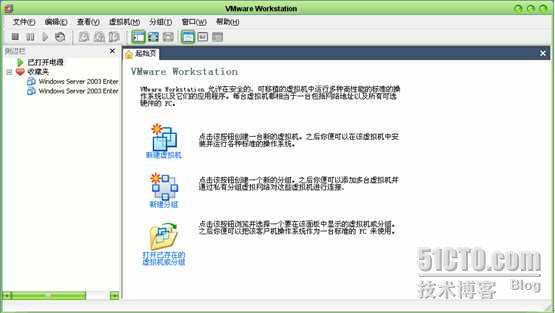
虚拟机的操作系统的安装
虚拟机的操作系统的安装启动虚拟机进入下一步,按Enter键开始安装。按F8许可协议选则C创建分区再按C,将未划分的分区划分按ENTER继续,选择NTFS文件系统格式化磁盘分区写上姓名和单位,单击下一步直接点击关闭<?xml:namespace pr…
2020,国产AI开源框架“亮剑”TensorFlow、PyTorch
「AI技术生态论」 人物访谈栏目是CSDN发起的百万人学AI倡议下的重要组成部分。通过对AI生态专家、创业者、行业KOL的访谈,反映其对于行业的思考、未来趋势的判断、技术的实践,以及成长的经历。 2020年,CSDN将对1000人物进行访谈,形…

Centos下部署Solr 搜索引擎
一、环境准备:系统环境:centos 6.5tomcat 7.0.47jdk-7u9solr-4.7.0首先将软件包上传到/tmp目录下1、 jdk安装[rootsvn-server /]# cd /tmp/ [rootsvn-server /]#tar zxvf jdk-7u9-linux-x64.tar.gz[rootsvn-server /]#mv jdk1.7.0_09 /u…
Redis源码分析-TCMalloc
redis很多地方都在调用zmalloc函数 zmalloc在这里定义zmalloc.c void *zmalloc(size_t size) {void *ptr malloc(sizePREFIX_SIZE);if (!ptr) zmalloc_oom_handler(size); #ifdef HAVE_MALLOC_SIZEupdate_zmalloc_stat_alloc(zmalloc_size(ptr));return ptr; #else*((size_t…
让AI训练AI,阿里和浙大的“AI训练师助手”是这样炼成的
不久前,人力资源社会保障部发布了一种炙手可热的新职业:AI训练师。没想到,浙江大学与阿里安全的人工智能训练师马上创造出一个 “AI训练师助手”,高效打造AI深度模型,应对海量应用场景的增加,让AI训练模型面…
用 Navicat for Oracle 管理 Oracle10g/11g 数据库
Navicat for xxx 是一个优秀的数据库管理客户端,有 MySQL、Oracle 等版本。建议大家最好用 Enterprise 版本,功能全面一些,但较之于免费的 Lite 版,企业版可是要花银子买的。 安装 Navicat for Oracle 后,首先需要建一…
借一个同事的经历,谈一谈程序员的成长
一个很久之前的同事,今天找我,想让我帮他推荐下,去我们公司来工作,因为认识很久,就和他说了说公司的现状,也询问了一下他的状况,寒暄几句,让他下周等面试。 这位同事是之前一起做游戏…
select,epoll,poll比较
select,poll,epoll简介 select select本质上是通过设置或者检查存放fd标志位的数据结构来进行下一步处理。这样所带来的缺点是: 1 单个进程可监视的fd数量被限制 2 需要维护一个用来存放大量fd的数据结构,这样会使得用户空间和内…
华为开发者大会HDC.Cloud技术探秘:云搜索服务技术实践
搜索是一个古老的技术,从互联网发展的第一天开始,搜索技术就绽放出了惊人的社会和经济价值。随着信息社会快速发展,数据呈爆炸式增长,搜索技术通过数据收集与处理,满足信息共享与快速检索的需求。基于搜索技术…
从今天开始,自己做SEO。
1.购买了一点黑链。开始优化之路。 2.更改了关键词,描述。 3.整理了友情链接。 4.购买了VPS服务器:点击查看 转载于:https://www.cnblogs.com/zq535228/archive/2010/06/09/1754986.html

Elasticsearch2.2.0配置文件说明
为什么80%的码农都做不了架构师?>>> 官方配置文档 https://www.elastic.co/guide/en/elasticsearch/reference/current/setup.html 配置详解 # ---------------------------------- Cluster (集群配置)----------------------…
各种类型的字节数
int类型比较特殊,具体的字节数同机器字长和编译器有关。如果要保证移植性,尽量用__int16 __int32 __int64吧,或者自己typedef int INT32一下。 C、C标准中只规定了某种类型的最小字节数(防止溢出) 64位指的是cpu通用寄…
154 万 AI 开发者用数据告诉你,中国 AI 如何才能弯道超车?| 中国 AI 应用开发者报告...
曾经,软件吞噬世界。现在,AI 吞噬软件。作者 | 屠敏数据 | 杨阳、刘学涛可视化&策划 | 唐小引出品 | CSDN(ID:CSDNnews)从三年前年薪 25 万只是白菜价,到去年华为以年薪最高达 201 万招揽顶尖应届毕业生…
中国移动用户能不能用WCDMA网?(世界杯与通信2)
到南非有移动的用户也有联通的用户,联通的网络快这是肯定的,不过联通的通话价格也比移动的高,就有人希望拿着移动的号去南非,最好也能享受WCDMA的网络速度,这样就是两全其美了,对于这个问题,在国…

平安陆金所-点金计划,简直是骗子行为。
陆金所点金计划,让人防不胜防。平安保险,骗子中的教练。 转载于:https://www.cnblogs.com/hthf/p/5205921.html

深度分析define预处理指令
#define语句 预处理 宏替换 --以上出自《C语言入门经典(第四版)》 #和## --出自《C语言程序设计:现代方法(第2版)》 #undef取消定义 --以上出自《21天学通C语言(第6版)》
建立YUM服务器CENTOS
1 ,YUM Client:要保证安装有如下软件包:yum-3.2.19-18.el5.centosyum-metadata-parser-1.1.2-2.el52 ,YUM Server:要保证安装有如下软件包:yum-3.2.19-18.el5.centosyum-metadata-parser-1.1.2-2.el5yum-fastestmirror…
数据库设计的10个最佳实践
作者 | Emily Williamson译者 | 孙薇,责编 | 屠敏出品 | CSDN(ID:CSDNnews)以下为译文:数据库是应用及计算机的核心元素,负责存储运行软件应用所需的一切重要数据。为了保障应用正常运行,总有一…
十进制转化为十六进制分割高低位
2019独角兽企业重金招聘Python工程师标准>>> 将十进制1000,转化为十六进制,则为0x03E8,如果得到高低位,high0x03,low0xE8 BYTE high;BYTE low;int temp_data1nWeightValue;highBYTE(temp_data1 >>8);int temp_data2nWeightV…
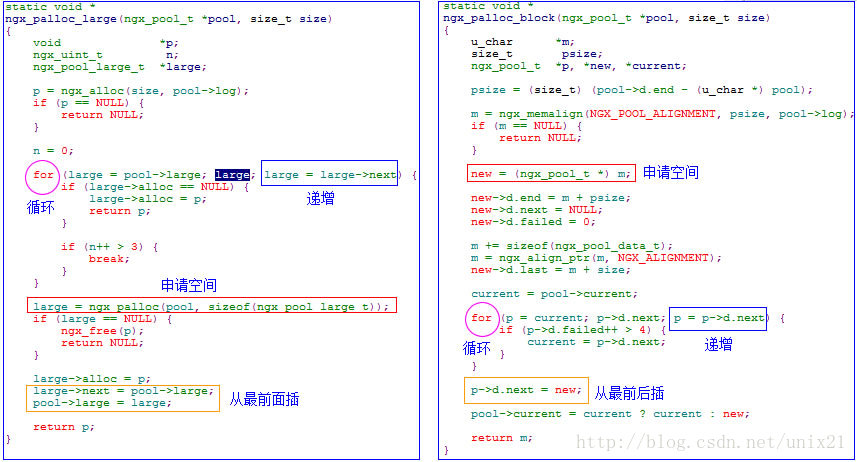
Nginx内存池--pool代码抽取(链表套路)
ngx_palloc.c文件 ngx_palloc_large_hm是自己写的代码没有nginx原版的ngx_palloc_large写的好,细节要品味才会发现nginx的美 nginx链表的套路,正好是两种插入“从前插”和“从后插”,有些许差别 #include <stdio.h> #include <std…

阿里再次主办大数据世界杯, KDD Cup2020正式开赛
记者从国际计算机科学顶会ACM SIGKDD官网获悉,KDD Cup 2020今日正式开赛,本届比赛由阿里巴巴达摩院主办。随即,阿里公布了认知智能、曝光偏差两大赛题方向,并向全球参赛者开放最大规模的商品多模态数据集。阿里也是两次举办该赛事…
grep 正则表达式
grep 正则表达式来源:http://blog.rednet.cn/user1/213546/archives/2007/35795.html以下为整理的grep 正则表达式的大部分功能,详细参见man grep: 要用好grep这个工具,其实就是要写好正则表达式,所以这里不对grep的所有功能进行实例讲解,只列…
Mybatis缓存机制理解及配置
2019独角兽企业重金招聘Python工程师标准>>> 1. Ehcache EHCache是来自sourceforge(http://ehcache.sourceforge.net/)的开源项目,也是纯Java实现的简单、快速的Cache组件。EHCache支持内存和磁盘的缓存,支持LRU、…
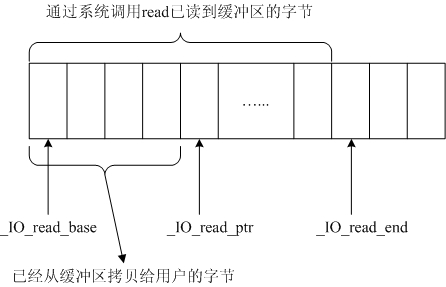
浅谈无缓存I/O操作和标准I/O文件操作区别 (转载)
首先,先稍微了解系统调用的概念: 系统调用,英文名system call,每个操作系统都在内核里有一些内建的函数库,这些函数可以用来完成一些系统系统调用把应用程序的请求传给内核,调用相应的的内核函数完成所需的…
Android之ListActivity(一):布局与数据绑定
Android中的列表,当然也可以用ListView来完成所需要的功能,用法是一样的。 废话不说,来关键的。 LiveActivity本身继承了关于List操作的众多接口,我们可以方便的重写这些操作中需要的方法来实现自己需要的功能。 如果要用ListActi…
用于单图像超分辨率的对偶回归网络,达到最新SOTA | CVPR 2020
作者 | Yong Guo, Jian Chen等译者 | 刘畅出品 | AI科技大本营(ID:rgznai100)通过学习从低分辨率(LR)图像到高分辨率(HR)图像之间的非线性映射函数,深度神经网络在图像超分辨率(SR&a…
老生常谈,joomla wordpress drupal,你该选择哪个CMS?
本人从事Joomla建站多年,给客户建站都是用Joomla,所以我会极力推荐你选择Joomla? No No No,这样未免太Hard sale了。 虽然这是一个会经常被提到的问题,网上也有不少优秀的答案,但我还是想把自己的想法跟大家…